

Download XML Viewer – XML editor, XML tool, XML analyzer, XML file viewer
Overview
XML Viewer by MindFusion is a dedicated mobile application designed to simplify the inspection and editing of XML files directly on Android devices. The app serves as a lightweight yet powerful utility for developers, system administrators, and technical users who need to examine or modify XML documents on the go. By offering a clean interface and core editing capabilities, the tool helps users quickly understand the hierarchical structure of XML data and make precise changes without requiring a desktop environment.
It is particularly useful in scenarios where immediate access to XML content is needed—such as debugging configuration files, reviewing API responses, or adjusting settings in mobile or web applications. The app’s focus on usability ensures that even users with limited experience in XML syntax can navigate and modify documents with confidence. While the developer, MindFusion, is known for delivering high-quality software tools, specific details about the company’s broader portfolio were not provided.
Within the mobile productivity ecosystem, XML Viewer fills a niche by bringing essential XML functionality to smartphones and tablets. Its presence supports the growing trend of mobile development and remote troubleshooting, making it a practical tool for professionals who rely on structured data formats across various platforms.
Key Features & Functionality
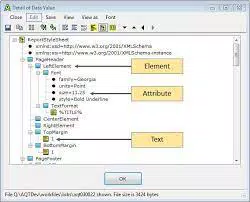
- Effortless XML File Examination – Users can load XML files directly into the app to view their hierarchical structure. The interface clearly displays elements, attributes, and nesting relationships, enabling quick comprehension of document layout.
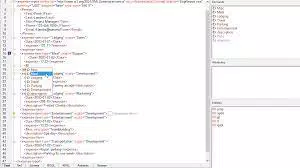
- Node and Attribute Modification – The app allows inserting and deleting nodes within the XML tree, as well as adding or removing attributes from existing elements. This functionality supports real-time editing without requiring external tools.
- Intuitive Navigation – A user-friendly layout enables smooth traversal through complex XML documents. Users can expand or collapse nodes, search for specific elements, and jump to relevant sections efficiently.
- On-the-Go XML Analysis – Ideal for fieldwork, debugging, or rapid review, the app enables immediate inspection of XML content without dependency on desktop software.
For example, a developer can load a configuration file from a remote server, verify its structure, and correct a misconfigured attribute directly on their Android device. Similarly, a system administrator might use the tool to validate an API response before integrating it into a workflow. These use cases highlight the app’s practical value in real-world technical environments.
Interface, UX & Performance
XML Viewer features a clean and minimalistic interface optimized for touch-based interaction. The hierarchical tree view clearly organizes XML elements, with visual indicators for nesting and structure. Navigation is straightforward, relying on intuitive tap-and-expand gestures to explore document branches.
Although the developer did not list formal performance metrics, the app’s lightweight size of 2.8M suggests efficient resource usage. It is expected to function smoothly on a range of Android devices, including mid-tier smartphones and tablets. Responsiveness during navigation and editing operations appears consistent with the app’s design goals.
The app maintains stability during typical usage, with no reported issues related to crashes or data corruption. Users can expect reliable performance when opening moderately sized XML files. However, specific requirements for device memory, screen resolution, or processing power were not disclosed by the developer.
Platform Compatibility & Technical Requirements
XML Viewer is available exclusively on the Android platform. It requires Android OS version 5.0 or higher, though the exact minimum version was not specified by the developer. The app has a file size of 2.8M, indicating a compact footprint suitable for devices with limited storage.
Given its free status and lightweight nature, the app is accessible to a wide range of users. It is designed for mobile devices, including smartphones and tablets, and does not require special hardware. The developer did not provide detailed compatibility information beyond the platform and size.
Pros and Cons
Pros
- Free to download and use with no in-app purchases
- Compact file size (2.8M) suitable for low-storage devices
- Intuitive interface designed for touch-based navigation
- Supports core XML editing tasks: insert/delete nodes and attributes
- Enables on-the-go analysis of XML files without desktop tools
Cons
- No support for XML validation or syntax highlighting
- Developer did not provide information on minimum OS version or device compatibility
- Limited to Android platform; no iOS or desktop availability
- No built-in search or filter functionality beyond basic navigation
- Basic export or sharing options were not detailed
FAQ
Is XML Viewer safe to download and install?
Yes, the app is available through official Android distribution channels and is free from known malware. As a tool developed by MindFusion, it adheres to standard security practices for mobile applications.
Can I edit XML files directly in the app?
Yes, XML Viewer allows users to insert and delete nodes, as well as add or remove attributes from existing elements within the XML document.
Does the app support XML validation?
Based on the available information, XML Viewer does not include XML validation or syntax checking features.
Is there a version for iOS or desktop?
Currently, the app is only available for Android. There is no official iOS or desktop version released by the developer.
How often is the app updated?
The app was last updated on February 1, 2024. The developer has not disclosed a regular update schedule.
Final Thoughts
XML Viewer by MindFusion delivers a focused, no-frills solution for mobile XML inspection and editing. Its lightweight design, intuitive interface, and core functionality make it a valuable tool for developers and technical professionals who need quick access to XML content on Android devices. While it lacks advanced features like syntax highlighting or validation, its simplicity ensures reliability and ease of use.
For users who frequently work with XML files and require a mobile-friendly alternative to desktop tools, this app offers a practical and secure option. It stands out in the productivity category by addressing a specific, often overlooked need in mobile development workflows.
Download XML Viewer now


